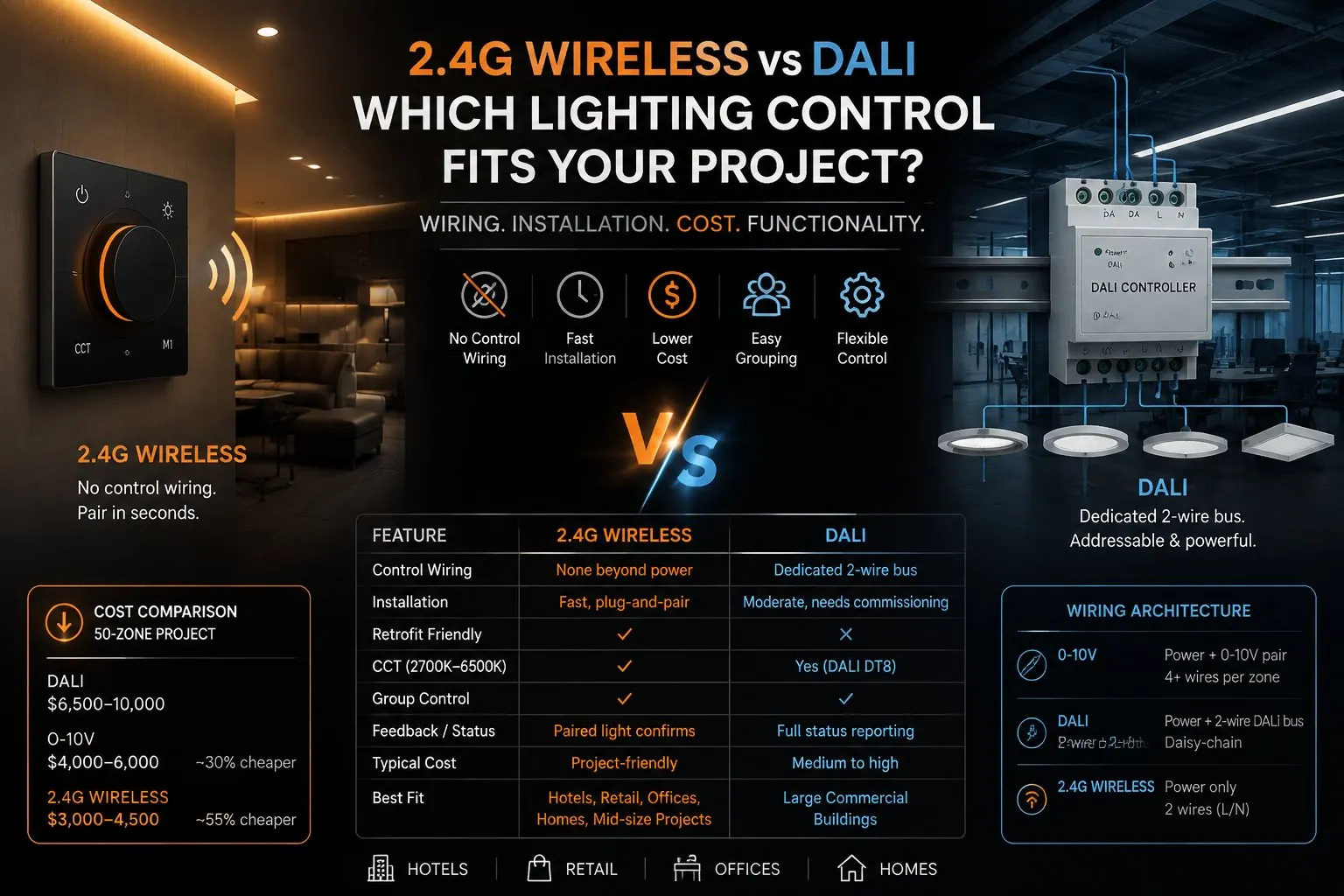
2.4G Wireless vs DALI: Which Lighting Control Fits Your Project?
Choosing a lighting control system usually comes down to one practical question: how much wiring is this project willing to pay for? 2.4GHz wireless lighting control and DALI are two of the most common answers on the market today, and they sit at opposite ends of that question — one avoids control wiring almost entirely, the other builds an entire addressable bus around it.
This guide compares the two systems on wiring, installation time, real cost, and functionality, and closes with a five-question checklist you can run through on any project. To be upfront about where we stand: SOLUXLED builds 2.4GHz wireless systems, not DALI. We’re not neutral, but we’ve tried to keep the comparison honest — including the parts where DALI is still the better choice.
What Is DALI Lighting Control?
DALI (Digital Addressable Lighting Interface) is an open, bus-based protocol built for large commercial buildings. Every fixture and controller shares a single 2-wire bus that daisy-chains through the building, and every device on that bus gets its own digital address — up to 64 devices per bus at 250mA.
Because every fixture is individually addressable, DALI supports fine-grained grouping, scene programming, and full status feedback (a controller can ask a fixture whether it’s actually on, dimmed, or faulted). That power comes with real overhead: DALI installations need commissioning software, trained installers, and — on larger jobs — a dedicated gateway or controller. It’s the standard many building management systems (BMS) are built to talk to, which is exactly why it remains the default choice for large-scale automation.
What Is 2.4GHz Wireless Lighting Control?
2.4GHz wireless lighting control removes the control bus entirely. Only power wiring (L/N) runs to the wall panel and to each fixture — dimming, CCT, grouping, and scene commands travel over local 2.4GHz RF instead of a dedicated cable.
Pairing is deliberately simple: power-cycle the fixture, then within a 5-second window, long-press the panel’s ON/OFF button for about a second. The fixture joins that panel’s group immediately — no addressing scheme, no commissioning software, no gateway. One panel can pair with multiple fixtures, and a fixture can be re-paired to a different panel at any time by repeating the same steps, which is what makes the system easy to reconfigure later.
2.4G Wireless vs DALI vs 0-10V: Side-by-Side Comparison
0-10V is worth including as a baseline, since it’s the cheapest wired option most projects have already ruled in or out.
| Feature | 2.4G Wireless | DALI | 0-10V |
|---|---|---|---|
| Control wiring | None beyond power | Dedicated 2-wire DALI bus | Extra low-voltage control wires |
| Installation | Fast, plug-and-pair | Moderate, needs commissioning | Moderate |
| Retrofit friendliness | Good — no new bus wiring | Harder without an existing bus | Harder without existing wiring |
| Scene control | Built into panel and fixtures | Yes, via controller/software | Limited, controller-dependent |
| CCT (warm/cool) | Yes, 2700K–6500K tunable | Yes (DALI DT8) | No |
| Group control | Yes, pair multiple lights | Yes, programmed groups | No |
| Feedback / status | Yes, paired light confirms | Yes, full status reporting | No |
| Typical cost | Project-friendly | Medium to high | Medium |
| Best fit | Hotels, retail, homes, offices, mid-size projects | Large commercial buildings | Simple centralized dimming |
Want the full picture, including KNX, Bluetooth mesh, Tuya, Mi Home and Apple Home across 12 comparison dimensions? Download the complete 2.4G vs DALI vs 0-10V comparison sheet →
Wiring Architecture: Why Cable Count Matters
The line-item differences above trace back to one thing: how many cables actually have to be pulled per zone.
| System | Power (L/N) | Control Wiring | Total Cables |
|---|---|---|---|
| 0-10V | Required | 1× 0-10V pair per zone | 4+ wires per zone |
| DALI | Required | 1× 2-wire DALI bus (daisy-chain) | Power + 2 DALI wires |
| 2.4G Wireless | Required | None — wireless | 2 wires (L/N) only |
DALI’s daisy-chained bus is more efficient than running a dedicated pair to every 0-10V zone, but it’s still a cable that has to be planned, pulled, and — on a retrofit — usually can’t reuse existing wiring. Wireless is the only column in that table with nothing beyond power, which is the main reason it installs faster and retrofits into buildings that were never wired for lighting control in the first place.
Real Cost Numbers: What a 50-Zone Project Actually Costs
Cost estimates for a typical 50-zone commercial project, based on factory-direct SOLUXLED pricing and general market ranges for DALI and 0-10V components:
| System | Estimated Total (50 Zones) | vs. DALI |
|---|---|---|
| DALI | $6,500–10,000 | Baseline |
| 0-10V | $4,000–6,000 | ~30% cheaper |
| 2.4G Wireless | $3,000–4,500 | ~55% cheaper |
The savings come from three places: no control cable to buy or pull, roughly half the installation labor per zone (plug-and-pair vs. commissioning and addressing), and no gateway or controller hardware to purchase. Cost figures are factory-direct estimates for SOLUXLED products; local market pricing for DALI and 0-10V components will vary by region and installer.
When Wireless Makes Sense
Wireless earns its keep in projects where either the wiring path doesn’t exist yet, or the project moves too fast to wait on commissioning:
- Retrofit projects with no existing control bus — there’s no cable to reuse, so wireless avoids pulling new cable entirely.
- Hotels, where each room needs independent scene control without a room-by-room DALI bus. See how this plays out on our hotel lighting control page →
- Retail stores that change layout often — re-pairing a fixture takes seconds, no rewiring required.
- Offices and homes at mid-size scale, where full DALI is more system than the project needs but basic scenes and grouping still matter.
The 2.4GHz knob dimmer panel → is the wall controller behind all of these — one panel per zone, pairing in seconds, no gateway to configure.
When DALI Still Wins
We’re not going to pretend wireless is the right call everywhere. DALI remains the better choice when:
- The project needs centralized, whole-building automation integrated with a BMS (HVAC, blinds, AV, lighting all on one system).
- The specification requires an open, multi-vendor protocol so different lighting brands can sit on the same bus.
- It’s a large commercial building — campus, high-rise, or anywhere the fixture count and complexity justify commissioning software and trained installers.
If a project fits any of those three, DALI or KNX is the standard choice, not a wireless workaround.
5 Questions to Choose the Right System
Run through these in order — the first “yes” usually tells you what you need.
| # | Question | If Yes |
|---|---|---|
| 1 | Is this a retrofit with no existing control wiring? | 2.4G Wireless avoids new bus cabling and speeds up installation. |
| 2 | Do you need centralized, whole-building automation with BMS integration? | DALI or KNX is the standard choice for large, centrally managed systems. |
| 3 | How many rooms or zones need independent scenes? | 2.4G Wireless scales well room-by-room for hospitality and retail. |
| 4 | Is the project fast-moving with a tight installation schedule? | 2.4G Wireless installs faster with less pre-planning and commissioning. |
| 5 | Do you need multiple third-party lighting brands on one open protocol? | DALI’s open standard suits large multi-vendor specifications. |
If most of your answers land on questions 1, 3, and 4, wireless is very likely the right fit. If they land on 2 or 5, start your specification with DALI or KNX instead.
Why Cloud-Based Smart Lighting (Tuya, Mi Home, Apple Home) Is Risky for Projects
It’s worth addressing a category that often gets lumped in with “wireless lighting control” but works very differently: cloud-connected smart lighting apps like Tuya, Mi Home, and Apple Home.
These platforms route app control, schedules, and device status through a cloud server. That introduces three problems a professional project doesn’t want:
- Platform dependency — if the cloud server has an outage, or access is restricted in a particular country, remote and app control stops working, even though the fixtures themselves are fine.
- Ecosystem lock-in — Apple Home only works inside the Apple ecosystem; Tuya and Mi Home carry their own regional and brand restrictions. None of them are built for open, cross-platform commercial deployment.
- Data routed off-site — usage patterns, schedules, and device status get stored on third-party servers instead of staying local to the building.
2.4GHz wireless control (like DALI, in this respect) is local: the wall panel talks directly to the fixture over RF, with no cloud round-trip required for core dimming, CCT, or scene control. An internet or server outage has no effect on it.
FAQ
Does 2.4G wireless lighting control work without internet? Yes. Core control — dimming, CCT, grouping, and scene recall — is local RF between the panel and the fixture. No internet connection or cloud account is required for the system to work.
Can I retrofit a building that already has DALI wiring installed? Yes, and either direction is possible: keep the existing DALI bus for zones it already serves, or use 2.4G wireless fixtures and panels in zones where no bus wiring exists yet — the two can coexist in the same building.
Is 2.4G wireless as reliable as DALI? Both are solid choices for their intended scale. DALI’s wired bus and full status feedback make it extremely dependable for large, centrally managed systems. 2.4G wireless is designed for local reliability at the room and zone level, without the commissioning overhead DALI requires at that scale.
Does SOLUXLED work with third-party lighting brands? SOLUXLED’s panels are designed to pair with SOLUXLED fixtures and with third-party lights fitted with a compatible RF receiver module. For fully open, multi-vendor specifications, DALI remains the more established standard.
Get the Full Comparison
This article covers the three systems most projects are actually choosing between. The full comparison sheet adds five more — KNX, Bluetooth mesh, Tuya, Mi Home, and Apple Home — across 12 dimensions including reliability, ecosystem, and market focus.
Download the full comparison sheet → Talk to an engineer about your project →